On this page
I keep a few generations of builds around while I’m working. Most are small, but an old installer, a recording or a compressed backup can outgrow the folder I’m looking at. I built CullByte to see those files in context.
A map you can follow
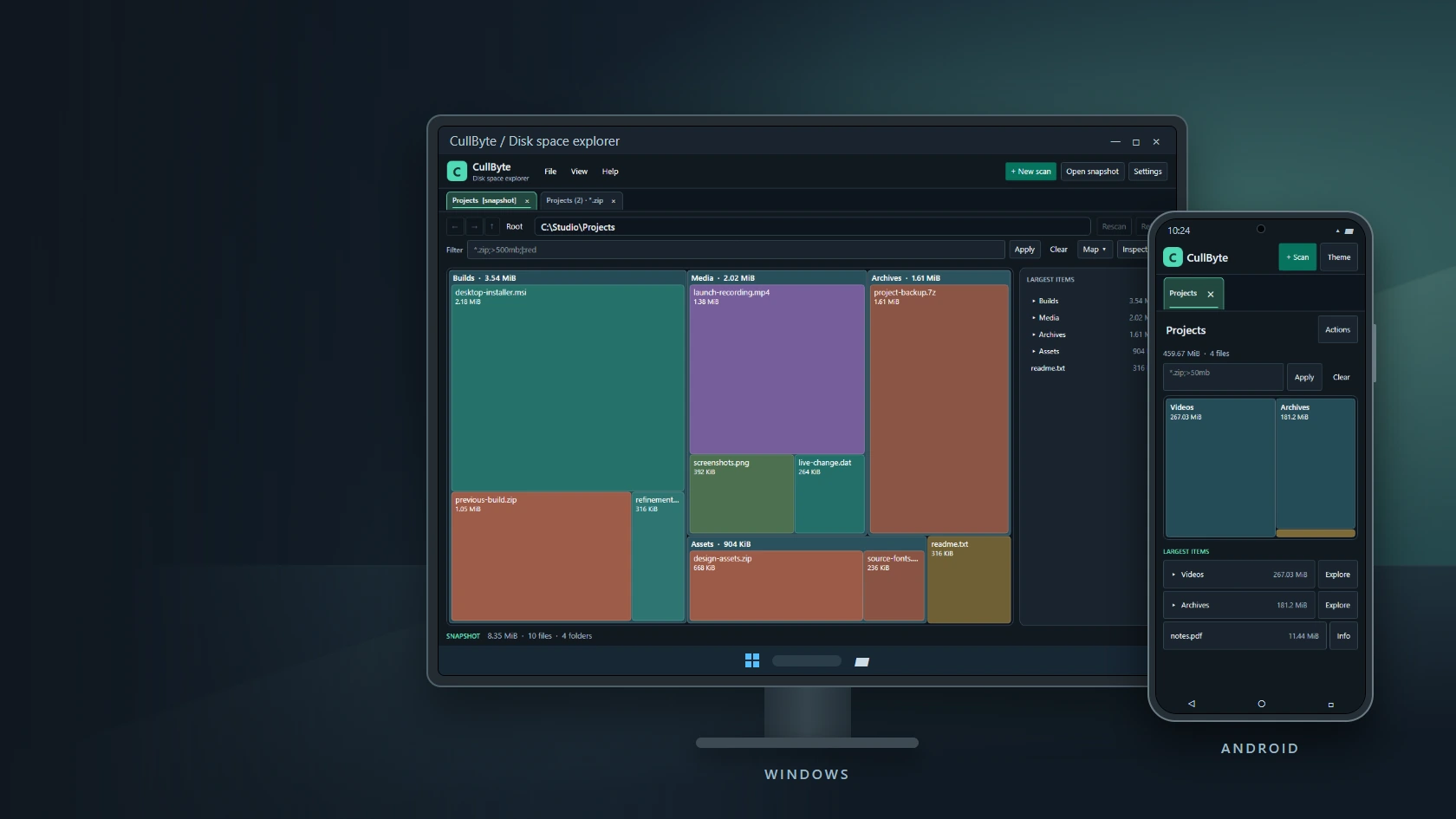
Every tile represents a file or folder. Its area follows its size, so the biggest branch is usually the one worth opening first. On Windows I can scan a drive or a folder, open a second view of the same scan and give that view its own filter. I can leave one tab on the whole folder and use another to look at archives.
The filter accepts expressions like *.zip;>500mb. I use the same view to see where the matches sit in the folder tree and to export a list if I want to come back to it later.
Try the two layouts
Choose Windows or Android below. Open a folder, go back and try the Archives tab. Type *.zip;>500mb to narrow the map. The preview uses a sample scan and stays inside the browser.
Loading interactive example…
<!doctype html> <html lang="en"> <head> <meta charset="utf-8"> <meta name="viewport" content="width=device-width,initial-scale=1"> <title>CullByte on Windows and Android</title> <style> *{box-sizing:border-box}body{margin:0;background:#0e151c;color:#eaf4f7;font:14px system-ui,sans-serif;padding:clamp(10px,3vw,22px)}button,input{font:inherit}button{cursor:pointer}button:focus-visible,input:focus-visible{outline:2px solid #6be4bf;outline-offset:2px}.demo{max-width:780px;margin:auto}.controls{display:flex;gap:6px;align-items:center;flex-wrap:wrap;margin-bottom:13px}.controls span{color:#aec1cc;margin-right:auto;font-size:12px}.controls button,.tool{border:1px solid #3a4d5a;background:#19242e;color:#eef5f7;border-radius:6px;padding:7px 10px;min-height:34px}.controls button[aria-pressed=true]{background:#22483f;border-color:#6be4bf;color:#bdf6e6}.device{max-width:750px;margin:auto;background:#20282f;padding:7px;border:1px solid #4d5b63;border-radius:9px;box-shadow:0 14px 35px #0007}.screen{overflow:hidden;--canvas:#111820;--panel:#19242e;--line:#3a4d5a;--ink:#eef5f7;--muted:#acbec9;--accent:#6be4bf;--selected:#22483f;--recess:#0d151d;background:var(--canvas);color:var(--ink);border-radius:4px}.screen.light{--canvas:#f3f7f8;--panel:#fff;--line:#a0b3be;--ink:#182b35;--muted:#48606e;--accent:#006a55;--selected:#d1f1e6;--recess:#e5edf0}.windows-bar,.taskbar,.phone-status,.android-nav{display:flex;justify-content:space-between;align-items:center;padding:5px 9px;font-size:11px;background:var(--panel);color:var(--muted)}.windows-bar{border-bottom:1px solid var(--line)}.taskbar{border-top:1px solid var(--line);justify-content:center;gap:9px;height:22px}.windows-logo{display:grid;grid-template-columns:repeat(2,5px);gap:1px;transform:skewY(-5deg)}.windows-logo i{height:5px;background:#41aaf4}.desk-stand{height:15px;width:21%;margin:auto;background:#303941;border-radius:0 0 8px 8px;border:1px solid #4d5b63;border-top:0}.phone-status,.android-nav{display:none}.phone{max-width:355px;padding:6px;border-radius:29px;background:#273038}.phone .screen{border-radius:23px}.phone .phone-status{display:flex;position:relative;height:26px;padding:5px 13px}.camera{position:absolute;width:7px;height:7px;border-radius:50%;background:#04090c;top:7px;left:calc(50% - 3px)}.phone .android-nav{display:flex;justify-content:space-around;height:25px;border-top:1px solid var(--line);font-size:10px}.phone .windows-bar,.phone .taskbar,.phone+.desk-stand{display:none}.apphead{display:flex;justify-content:space-between;align-items:center;padding:7px 9px;border-bottom:1px solid var(--line);gap:5px}.brand{font-size:15px;font-weight:700;display:flex;align-items:center;gap:7px}.brand b{display:grid;place-items:center;background:#50d9b6;color:#0f302d;width:24px;height:24px;border-radius:6px}.tool{padding:4px 8px;min-height:32px;background:var(--panel);color:var(--ink);border-color:var(--line);white-space:nowrap}.tool:disabled{opacity:.48;cursor:default}.tabbar{display:flex;gap:5px;padding:5px 8px 0;background:var(--recess);border-bottom:1px solid var(--line);overflow:auto}.tabbar button{color:var(--muted);border:1px solid var(--line);border-bottom:0;background:var(--panel);border-radius:7px 7px 0 0;padding:6px 9px;white-space:nowrap}.tabbar button[aria-selected=true]{color:var(--ink);background:var(--selected);border-color:var(--accent);box-shadow:inset 0 -2px var(--accent)}.content{padding:8px}.path{display:flex;align-items:center;gap:6px;margin-bottom:6px}.path strong{overflow:hidden;white-space:nowrap;text-overflow:ellipsis;font-size:13px}.filter{display:flex;gap:5px;margin-bottom:7px}.filter input{min-width:0;flex:1;background:var(--panel);color:var(--ink);border:1px solid var(--line);border-radius:5px;padding:5px 7px}.work{display:grid;grid-template-columns:minmax(0,1fr) minmax(118px,23%);gap:7px}.map{position:relative;height:clamp(150px,33vw,260px);border-radius:7px;overflow:hidden;background:var(--recess);border:1px solid var(--line)}.tile{position:absolute;padding:5px;text-align:left;overflow:hidden;border:1px solid #ffffff40;border-radius:4px;color:#fff;display:flex;flex-direction:column;align-items:flex-start;justify-content:flex-start;font-size:11px;gap:2px}.tile:hover{border-color:currentColor}.tile b,.tile span{overflow:hidden;text-overflow:ellipsis;white-space:nowrap;max-width:100%}.tile span{font-size:10px}.light .tile{color:#14262f;border-color:#14262f40}.aside{padding:6px;border:1px solid var(--line);background:var(--panel);border-radius:7px;min-width:0}.aside strong{font-size:10px;color:var(--muted);display:block;margin-bottom:4px}.rows{display:grid;gap:3px}.rows button{width:100%;display:flex;justify-content:space-between;align-items:center;gap:5px;text-align:left;color:var(--ink);background:var(--canvas);border:1px solid var(--line);border-radius:4px;padding:5px;font-size:11px;min-height:25px}.rows button span:first-child{min-width:0;overflow:hidden;text-overflow:ellipsis;white-space:nowrap}.rows button span:last-child{white-space:nowrap;color:var(--muted)}.summary,.error,.detail{font-size:11px;margin:7px 0 0;color:var(--muted)}.error{color:#c76d5e}.detail{border:1px solid var(--line);border-radius:5px;padding:7px;overflow-wrap:anywhere}.empty{position:absolute;inset:10px;color:var(--muted);font-size:12px}.phone .work{grid-template-columns:1fr}.phone .map{height:160px}.phone .rows button{min-height:30px}.phone .rows button:nth-child(n+4){display:none}.phone .tool{min-height:36px}.phone .content{padding:7px}.phone .summary{margin-top:5px}@media(max-width:465px){.device:not(.phone) .work{grid-template-columns:1fr}.device:not(.phone) .rows{grid-template-columns:repeat(2,minmax(0,1fr))}.controls span{flex-basis:100%;margin-bottom:2px}.map{height:155px}}@media(prefers-reduced-motion:reduce){*{scroll-behavior:auto}} </style> </head> <body> <main class="demo"> <div class="controls" aria-label="Preview controls"> <span>Sample scan · no device access</span> <button type="button" id="windows" aria-pressed="true">Windows</button><button type="button" id="android" aria-pressed="false">Android</button> <button type="button" id="theme">Light theme</button> </div> <div class="device" id="device"> <div class="screen" id="screen"> <div class="windows-bar" aria-hidden="true"><span>CullByte / Disk space explorer</span><span>─ □ ×</span></div> <div class="phone-status" aria-hidden="true"><span>10:24</span><i class="camera"></i><span>▴ ▰</span></div> <div class="apphead"><span class="brand"><b>C</b> CullByte</span><button type="button" class="tool" id="reset">Reset sample</button></div> <div class="tabbar" role="tablist" aria-label="Sample views"><button type="button" role="tab" id="projects-tab" aria-selected="true">Projects</button><button type="button" role="tab" id="archives-tab" aria-selected="false">Archives · *.zip</button></div> <div class="content"> <div class="path"><button type="button" class="tool" id="back" aria-label="Go to parent folder">‹ Back</button><strong id="path"></strong></div> <div class="filter"><input id="query" aria-label="Filter by filename or size" placeholder="*.zip;>500mb"><button type="button" id="apply" class="tool">Apply</button><button type="button" id="clear" class="tool">Clear</button></div> <div class="work"><div class="map" id="map" aria-label="Storage treemap"></div><div class="aside"><strong>LARGEST ITEMS</strong><div class="rows" id="rows"></div></div></div> <p id="summary" class="summary" aria-live="polite"></p><p id="error" class="error" role="alert" hidden></p><p id="detail" class="detail" aria-live="polite" hidden></p> </div> <div class="taskbar" aria-hidden="true"><span class="windows-logo"><i></i><i></i><i></i><i></i></span><span>⌕</span><span>▰</span></div> <div class="android-nav" aria-hidden="true"><span>◁</span><span>○</span><span>□</span></div> </div> </div><div class="desk-stand" aria-hidden="true"></div> </main> <script> const folder=(name,children)=>({name,children}); const file=(name,mb,color)=>({name,mb,color}); const root=folder('Projects',[ folder('Builds',[file('desktop-installer.msi',1580,'#26706b'),file('previous-build.zip',940,'#955a48')]), folder('Media',[file('launch-recording.mp4',1720,'#70578f'),file('screenshots.png',350,'#4b6d50')]), folder('Archives',[file('project-backup.zip',1380,'#955a48'),file('assets-2024.7z',430,'#955a48')]), folder('Assets',[file('design-assets.zip',690,'#955a48'),file('type-samples.pdf',185,'#71633a')]), file('notes.pdf',86,'#71633a') ]); const $=id=>document.getElementById(id); const size=mb=>mb>=1024?(mb/1024).toFixed(2)+' GiB':mb+' MiB'; const makeViews=()=>[{route:[root],query:''},{route:[root],query:'*.zip'}]; const devices={windows:{active:0,views:makeViews()},android:{active:0,views:makeViews()}}; let platform='windows',light=false; const state=()=>devices[platform]; const current=()=>state().views[state().active]; function parse(query){ const masks=[],rules=[]; for(const token of query.split(';').map(x=>x.trim()).filter(Boolean)){ const term=token.startsWith('|')?token.slice(1).trim():token,exclude=token.startsWith('|'); if(!term) throw Error('Enter a term after |.'); if(/^[<>]/.test(term)){ const parts=term.match(/^([<>])\s*(\d+(?:\.\d+)?)\s*(mb|gb)$/i); if(!parts) throw Error('Use a size such as >500mb or <2gb.'); const amount=Number(parts[2])*(parts[3].toLowerCase()==='gb'?1024:1); rules.push(item=>(parts[1]==='>'?item.mb>amount:item.mb<amount)!==exclude); }else{ const pattern=term.toLowerCase().split('').map(c=>c==='*'?'.*':c==='?'?'.':(/[\\^$+.[\]{}()|]/.test(c)?'\\'+c:c)).join(''); const regex=new RegExp(term.includes('*')||term.includes('?')?'^'+pattern+'$':pattern,'i'); if(exclude) rules.push(item=>!regex.test(item.name)); else masks.push(item=>regex.test(item.name)); } } return item=>rules.every(test=>test(item))&&(!masks.length||masks.some(test=>test(item))); } function totals(node,match){ if(!node.children) return match(node)?{mb:node.mb,count:1}:{mb:0,count:0}; return node.children.map(child=>totals(child,match)).reduce((a,b)=>({mb:a.mb+b.mb,count:a.count+b.count}),{mb:0,count:0}); } function render(){ const view=current(), node=view.route.at(-1),match=parse(view.query); const items=node.children.map(item=>({item,...totals(item,match)})).filter(x=>x.mb>0).sort((a,b)=>b.mb-a.mb); $('windows').setAttribute('aria-pressed',platform==='windows'); $('android').setAttribute('aria-pressed',platform==='android'); $('device').classList.toggle('phone',platform==='android'); $('screen').classList.toggle('light',light); $('theme').textContent=light?'Dark theme':'Light theme'; $('projects-tab').setAttribute('aria-selected',state().active===0); $('archives-tab').setAttribute('aria-selected',state().active===1); $('path').textContent=(platform==='windows'?'C:\\Studio\\':'Internal storage / ')+view.route.map(x=>x.name).join(platform==='windows'?'\\':' / '); $('back').disabled=view.route.length===1; $('query').value=view.query; $('error').hidden=$('detail').hidden=true; $('map').replaceChildren(); $('rows').replaceChildren(); if(items.length) partition(items,0,0,100,100); else{const empty=document.createElement('p');empty.className='empty';empty.textContent='No matching files.';$('map').append(empty)} for(const entry of items){ const row=button(entry),label=document.createElement('span'),amount=document.createElement('span'); label.textContent=(entry.item.children?'▸ ':'')+entry.item.name;amount.textContent=size(entry.mb); row.append(label,amount);$('rows').append(row); } const total=totals(node,match); $('summary').textContent=size(total.mb)+' · '+total.count+' '+(total.count===1?'file':'files')+(view.query?' matching the filter':'')+' · sample data'; } function button(entry){ const b=document.createElement('button');b.type='button'; b.setAttribute('aria-label',entry.item.name+', '+size(entry.mb)+(entry.item.children?', open folder':'')); b.onclick=()=>{ if(entry.item.children){current().route.push(entry.item);render();$('back').focus()} else{$('detail').textContent=entry.item.name+' · '+size(entry.mb);$('detail').hidden=false} }; return b; } function partition(items,x,y,w,h){ if(items.length===1){ const entry=items[0],tile=button(entry); const label=document.createElement('b'),amount=document.createElement('span'); label.textContent=entry.item.name;amount.textContent=size(entry.mb); tile.className='tile'; const color=entry.item.color||'#284f5d'; Object.assign(tile.style,{left:x+'%',top:y+'%',width:w+'%',height:h+'%', background:light?'color-mix(in srgb, '+color+' 43%, #f3f7f9)':color}); if(w>9&&h>10)tile.append(label,amount); $('map').append(tile);return; } const total=items.reduce((n,item)=>n+item.mb,0); let sum=items[0].mb,index=1; while(index<items.length-1&&Math.abs(total/2-(sum+items[index].mb))<Math.abs(total/2-sum))sum+=items[index++].mb; const share=sum/total; if(w*$('map').clientWidth>=h*$('map').clientHeight){ partition(items.slice(0,index),x,y,w*share,h); partition(items.slice(index),x+w*share,y,w*(1-share),h); }else{ partition(items.slice(0,index),x,y,w,h*share); partition(items.slice(index),x,y+h*share,w,h*(1-share)); } } $('windows').onclick=()=>{platform='windows';render()}; $('android').onclick=()=>{platform='android';render()}; $('theme').onclick=()=>{light=!light;render()}; $('projects-tab').onclick=()=>{state().active=0;render()}; $('archives-tab').onclick=()=>{state().active=1;render()}; $('reset').onclick=()=>{devices[platform]={active:0,views:makeViews()};render()}; $('back').onclick=()=>{if(current().route.length>1)current().route.pop();render()}; $('clear').onclick=()=>{current().query='';render();$('query').focus()}; function applyFilter(){ try{const query=$('query').value.trim();parse(query);current().query=query;render()} catch(error){$('error').textContent=error.message;$('error').hidden=false} } $('apply').onclick=applyFilter; $('query').onkeydown=event=>{if(event.key==='Enter')applyFilter()}; render(); </script> </body> </html>Interactive preview
The phone has a different job
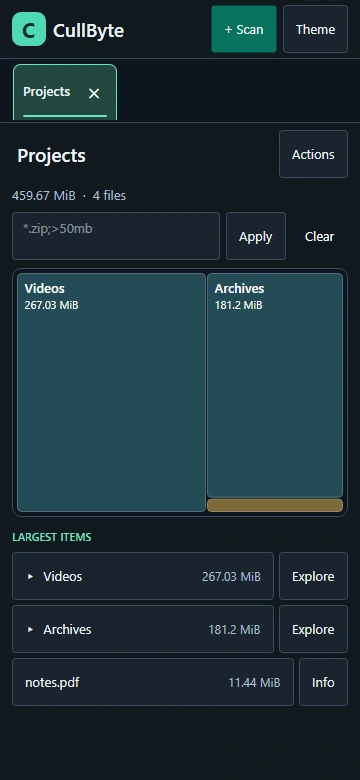
On Android I usually want to know what grew inside a folder I already recognise. I choose that folder in the system picker, then compare the map with a list I can read without zooming. On a narrow screen the list sits below the map. With more width it moves beside it. The map fills in as Android returns results. I can tap an item to bring up its location in Files, or use Explore to stay inside CullByte.
Android grants access to the selected folder and its contents. The Windows version can look at a drive as a whole and distinguish allocated space from logical file size. Android shows the file sizes reported by the document provider. A provider that cannot report a size is called out in the scan.
Keeping the two versions familiar
Both apps use C# and Avalonia. I share the theme, file-type colors and drawing primitives between the projects. The controls around the map differ because a mouse and a thumb need different layouts. The Windows app has an optional inspector and tabbed views that stay visible above the map. The Android app uses bigger touch targets and lets the map and list stack without squeezing the tiles into a narrow column.
THE CONVERSATION
What do you think?
A question, a different approach, or something worth adding.
Loading the conversation…
KEEP EXPLORING
More from the workbench
START A CONVERSATION
Have a problem worth solving?
Let’s talk about your idea, your team, or the work you’ve seen here.