On this page
A migration can work perfectly on an empty database and fail on the first real record. Existing rows are part of the input, not background scenery.
For a small SQLite application, I would rather rehearse against a recent backup than collect confidence from repeatedly creating a fresh schema.
The example here adds a display label to a generic table. The names and records are invented.
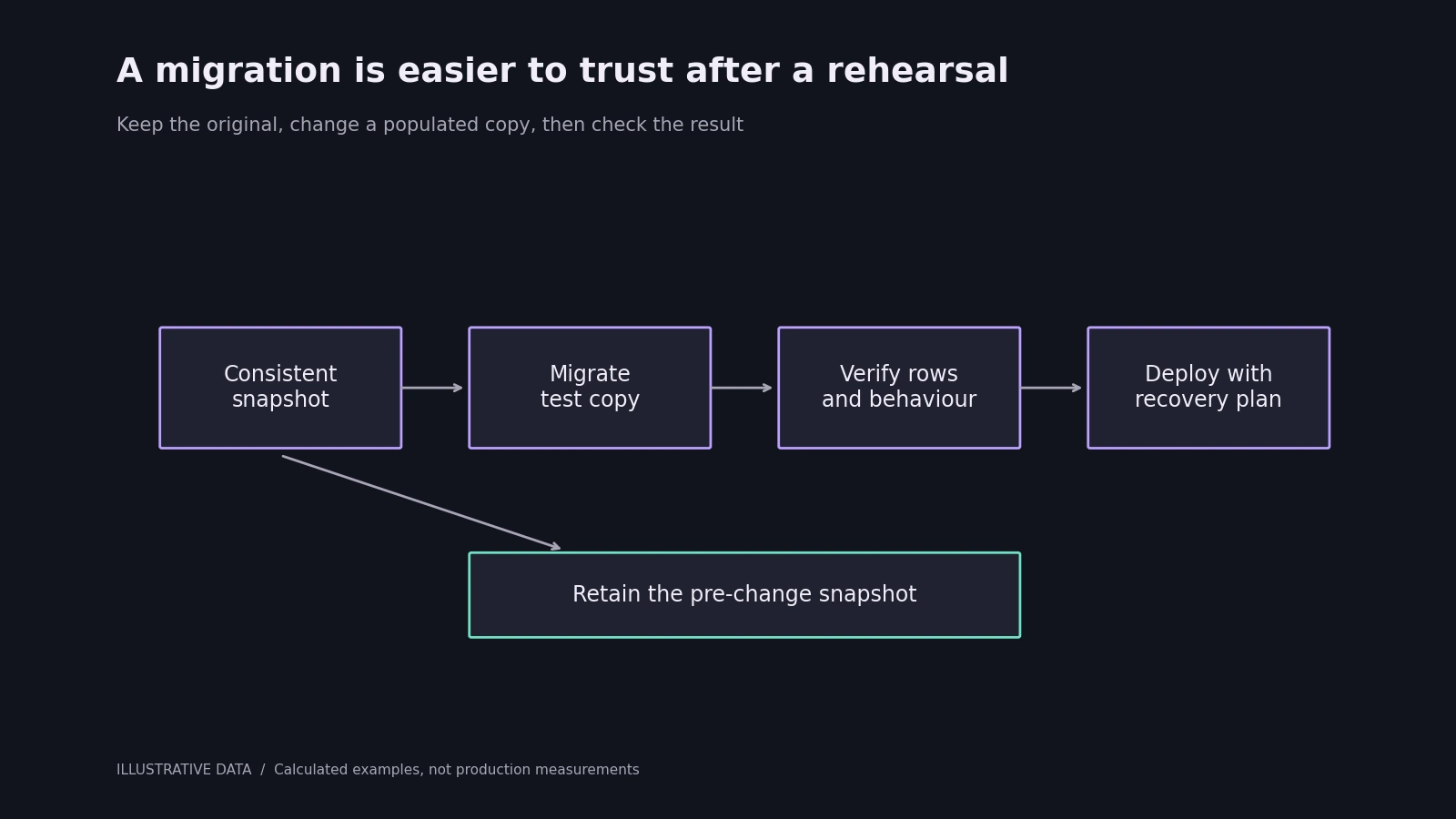
The diagram shows a rehearsal workflow. The original database stays separate from the test copy.
Take a consistent backup
Copying only the main database file while writes are in progress is a poor default, particularly when the application uses write-ahead logging. SQLite's backup API gives you a database-aware way to take a snapshot.
import sqlite3

source = sqlite3.connect('example.sqlite3')
backup = sqlite3.connect('example-before-change.sqlite3')
try:
    source.backup(backup)
finally:
    backup.close()
    source.close()
Keep sensitive backup files out of public directories. Also test that the copy opens. A backup path in a log is not evidence that the backup can be restored.
Make the version change part of the transaction
Here is a migration from version zero to version one:
import sqlite3

db = sqlite3.connect('example.sqlite3', isolation_level=None)
try:
    db.execute('BEGIN IMMEDIATE')
    version = db.execute('PRAGMA user_version').fetchone()[0]
    if version == 0:
        db.execute("ALTER TABLE entries ADD COLUMN label TEXT NOT NULL DEFAULT ''")
        db.execute('PRAGMA user_version = 1')
    elif version != 1:
        raise RuntimeError('Unexpected schema version')
    db.execute('COMMIT')
except Exception:
    if db.in_transaction:
        db.execute('ROLLBACK')
    raise
finally:
    db.close()
This assumes entries already exists. The default gives existing rows a value for the new non-null column. The version check means running the migration again does not try to add the same column twice.
BEGIN IMMEDIATE also makes contention visible at the start. It can wait or fail when another writer holds the database. Choose a maintenance strategy appropriate to the application's workload instead of treating a long lock as harmless.
Verify behaviour as well as schema
After the change, check the table definition, row count, key relationships and a few representative records. Exercise the code that reads and writes the new column.
For a transformation, calculate an expected result before running it. If a stored amount is being converted from whole units to thousandths, for example, choose several input values, including zero and a boundary value, and write down their expected outputs. A successful SQL statement can still perform the wrong conversion.
Test an interrupted or deliberately failed migration too. Raise an exception after the first schema statement and verify that the transaction rolled back. Then run the migration normally and run it a second time.
Rollback means more than restoring a file
Restoring the earlier snapshot can discard writes made since it was taken. If the application has continued accepting changes, that loss needs an explicit plan.
For a small maintenance window, pausing writes may be practical. For a continuously running service, use a change sequence in which the old and new application versions can coexist while the data is expanded and backfilled. Destructive changes come later, after the older code no longer needs the old shape.
I keep the application revision and schema version together in deployment notes. Restoring an older executable against an incompatible database is not a complete recovery.
The useful outcome of a rehearsal is a repeatable sequence with known checks and a realistic recovery path. Once that works on a populated copy, the production change has fewer unanswered questions.
References: SQLite backup API and ALTER TABLE behaviour.
THE CONVERSATION
What do you think?
A question, a different approach, or something worth adding.
Loading the conversation…
KEEP EXPLORING
More from the workbench
START A CONVERSATION
Have a problem worth solving?
Let’s talk about your idea, your team, or the work you’ve seen here.